CLI Reference
Published April 2026 · Updated May 2026
The rig CLI is the main way both people and coding agents operate OpenRig. It is human-readable by default, with --json on most commands for agents. Every command that changes something ends with a handoff: what happened, the current state, and the next action.
The full command surface is large and grows from release to release. This page covers the commands you reach for most. The coordination commands near the end (the queue, streams, and workflows) are how a fleet of agents actually passes work around.
Design Principles
Every mutating command ends with: what happened + current state + the next action.
Every error: what happened + why it is a problem + what to do next.
# Example handoff output:
Rig "auth-feats" restored (ID: abc123)
5/5 nodes ready: 3 resumed, 2 fresh (resume tokens expired)
Dashboard: http://localhost:7433/rigs/abc123
Orchestrator: tmux attach -t orch-lead@auth-feats

# Example error output:
Error: pod "dev1" member "impl" has runtime "bogus"
  Expected: claude-code, codex, or terminal
  Fix: update your rig spec at pods[0].members[0].runtime
Core Loop
The operator workflow: whoami (where am I?) → ps (what is running?) → transcript/ask (what happened?) → act (send, expand, down).
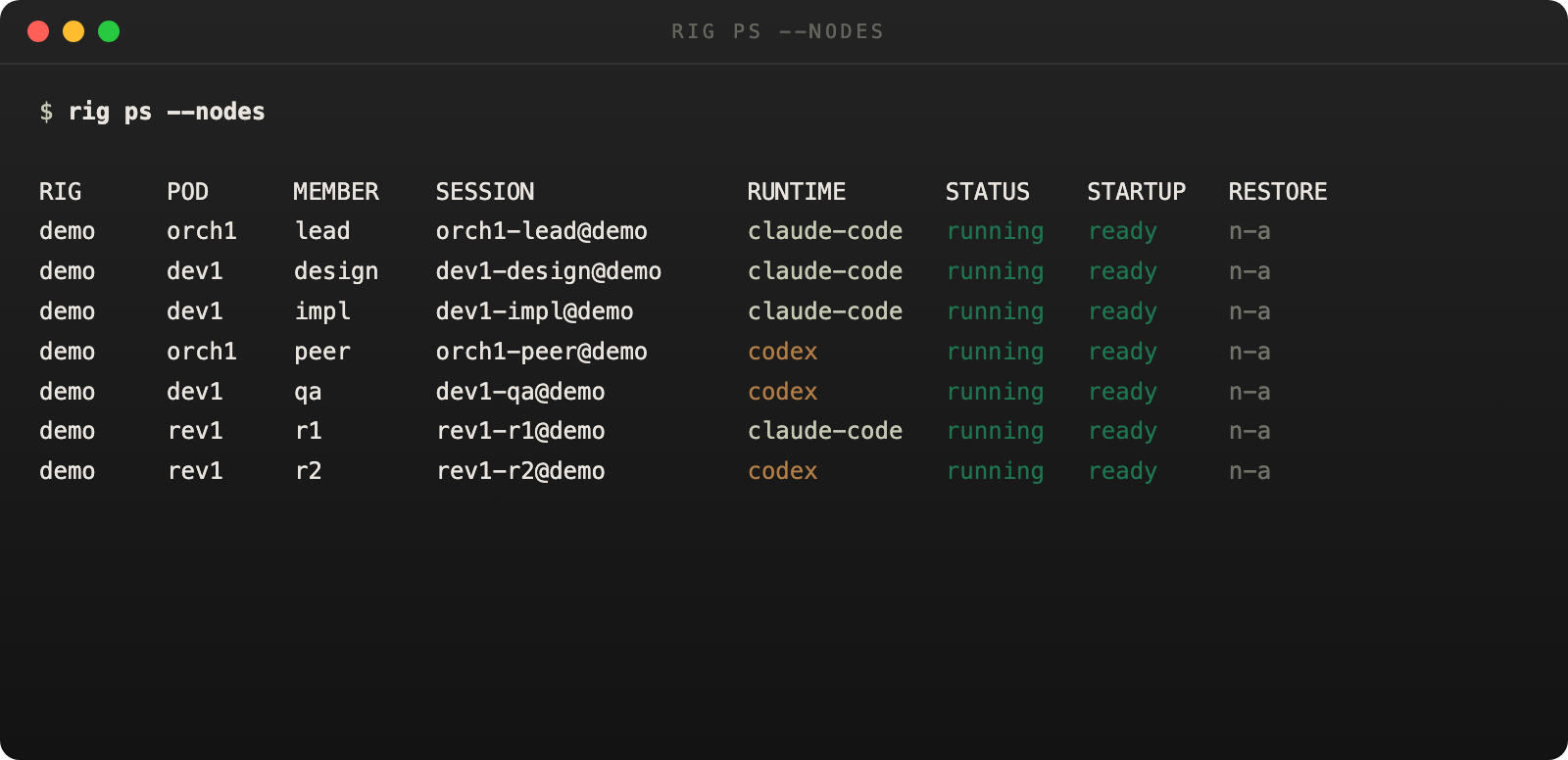
The table view is the best CLI proof that OpenRig is managing a real topology instead of a single opaque session.
rig whoami
Show the current managed identity in an OpenRig topology. Resolves identity through a 7-level cascade: --node-id flag, --session flag, OPENRIG_NODE_ID / RIGGED_NODE_ID env, OPENRIG_SESSION_NAME / RIGGED_SESSION_NAME env, tmux pane @rigged_node_id, tmux pane @rigged_session_name, raw tmux session name.
rig whoami [--node-id <id>] [--session <name>] [--json]
--node-idExplicit node ID override.--sessionExplicit session name override.--jsonPartial result if daemon is unreachable but identity can still resolve.# From inside a managed tmux session: rig whoami # Node: impl@auth-pod (rig: auth-feats) # Runtime: claude-code # Transcript: ~/.openrig/transcripts/auth-feats/impl@auth-pod.log # Explicit override: rig whoami --node-id abc123 --json
rig ps
Process status. Lists running rigs, or expands into a cross-rig node inventory with session names, runtimes, startup status, restore outcomes, attach commands, and errors.
rig ps [--nodes] [--json]
--nodesExpand into per-node detail across all rigs.--jsonStructured JSON output.# List all rigs: rig ps # Show every node across all rigs: rig ps --nodes
rig transcript
Read agent transcript output. Reads transcript files, not pane scrollback.
rig transcript <session> [--tail <lines>] [--grep <pattern>] [--json]
<session>Session name to read transcripts for.--tailNumber of lines from the end (default: 50).--grepRegex pattern filter.rig ask
Query rig evidence from transcript and chat history. This is a daemon-backed evidence query, not a second LLM invocation. Returns rig summary, evidence excerpts, optional chat excerpts, an insufficient flag, and optional guidance.
rig ask <rig> <question> [--json]
<rig>Rig name to query.<question>Natural language question.# Check what an agent has been doing: rig ask auth-feats "has the reviewer approved the auth changes?" # Structured output for automation: rig ask auth-feats "what errors occurred in the last hour?" --json
Lifecycle
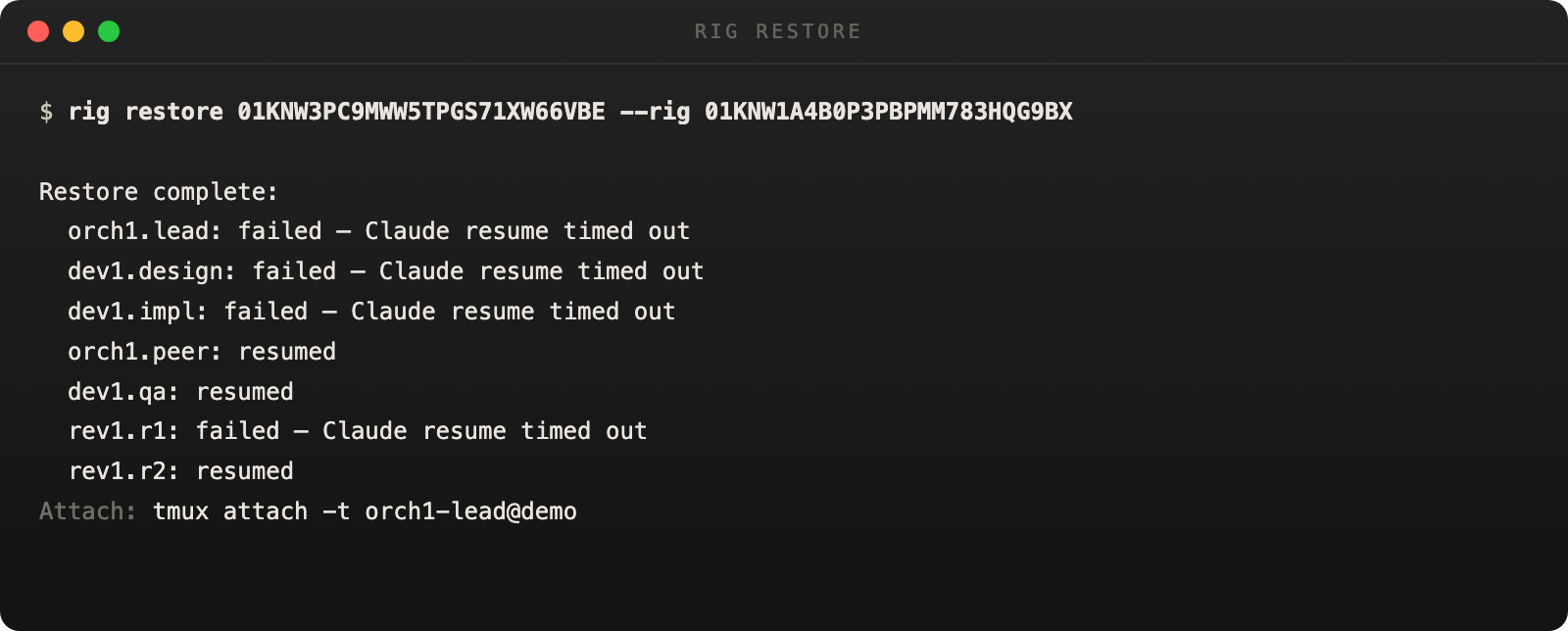
The teardown handoff is designed to point directly at the next restore command.
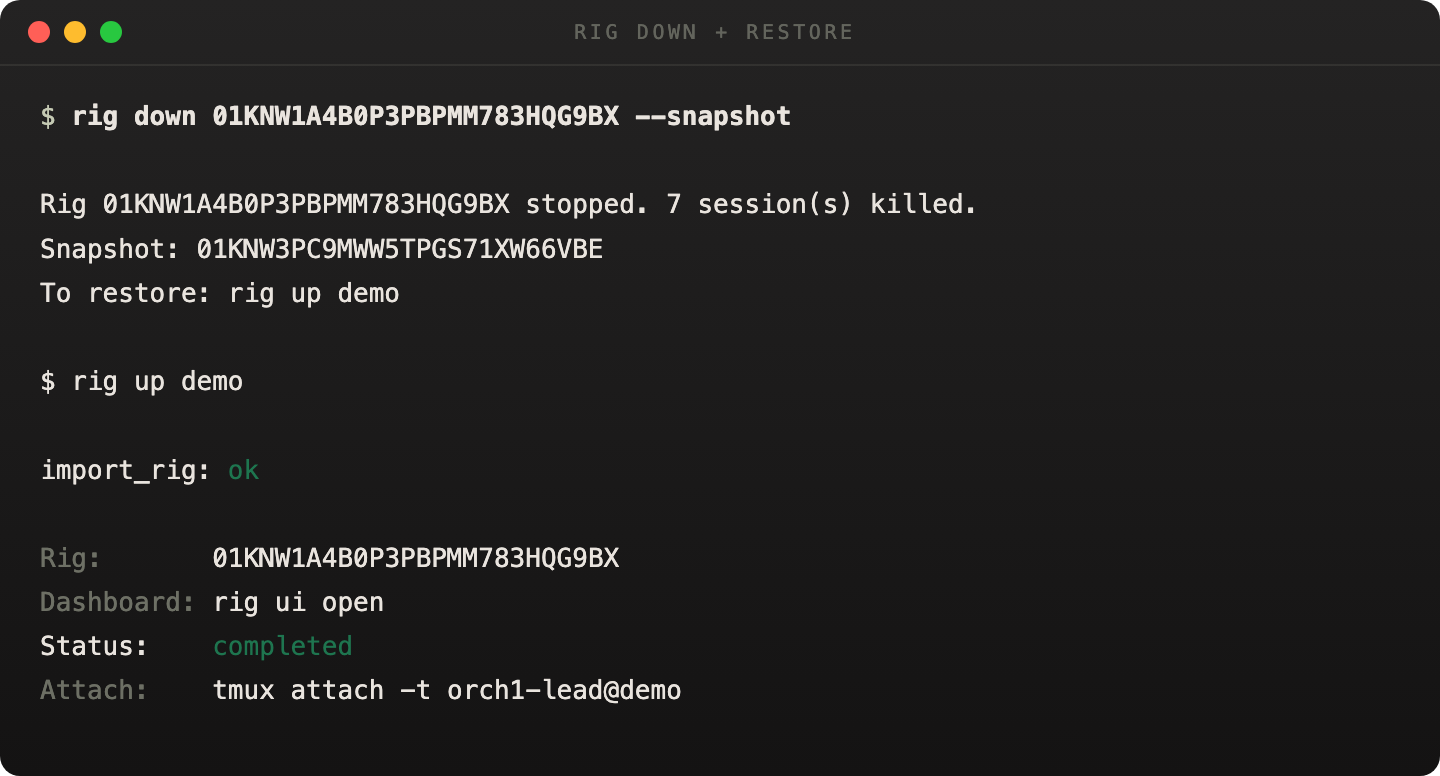
Teardown output carries the next-step restore hint inline.
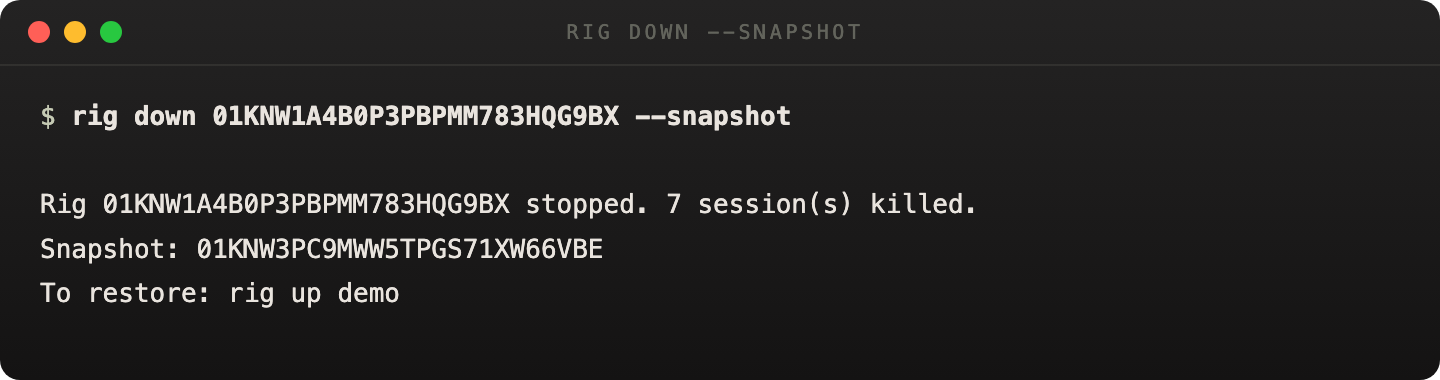
Restore truth is per-node. Some sessions resume, some come back fresh, and failures are explicit.
rig up
Boot a new rig from a spec, restore from a snapshot, or install from a bundle. Source resolution: a YAML path boots from that spec, a .rigbundle path installs and bootstraps, and a bare name checks the spec library first then treats it as an existing rig to restore. If a name matches both, the command exits with an ambiguity error.
rig up <source> [--plan] [--yes] [--target <root>] [--json]
<source>A .yaml spec path, .rigbundle path, or bare name.--planShow the execution plan without running.--yesSkip confirmation prompts.--targetRoot directory for agent resolution.--jsonStructured JSON output.# Boot from a spec file: rig up auth-rig.yaml --target . # Restore an existing rig by name: rig up auth-feats # Install from a bundle: rig up my-topology.rigbundle # Preview before booting: rig up auth-rig.yaml --plan
rig down
Tear down a running rig. When --snapshot succeeds, output includes the restore command. If the rig name is uniquely reusable, the handoff prefers rig up <rigName>.
rig down <rigId> [--delete] [--force] [--snapshot] [--json]
--deleteDelete the rig record after teardown.--forceKill sessions immediately.--snapshotTake a snapshot before teardown.--jsonStructured JSON output.# Graceful teardown with snapshot: rig down abc123 --snapshot # Rig stopped. Snapshot saved: snap-20260330. # To restore: rig up auth-feats # Force teardown and delete record: rig down abc123 --force --delete
rig snapshot
Capture a point-in-time snapshot of a running rig, or list existing snapshots.
rig snapshot <rigId>
rig snapshot list <rigId>
<rigId>The rig to snapshot or list snapshots for.rig restore
Restore a rig from a specific snapshot. Reports per-node outcome: resumed, fresh, or failed. Non-zero exit if any node fails.
rig restore <snapshotId> --rig <rigId>
<snapshotId>The snapshot to restore from.--rigRequired. The target rig ID.rig release
Release an adopted-session rig. Stops OpenRig management but leaves tmux sessions alive. Refuses if the rig contains OpenRig-launched nodes.
rig release <rigId> [--delete] [--json]
--deleteDelete the rig record after release.--jsonStructured JSON output.Discovery & Adoption
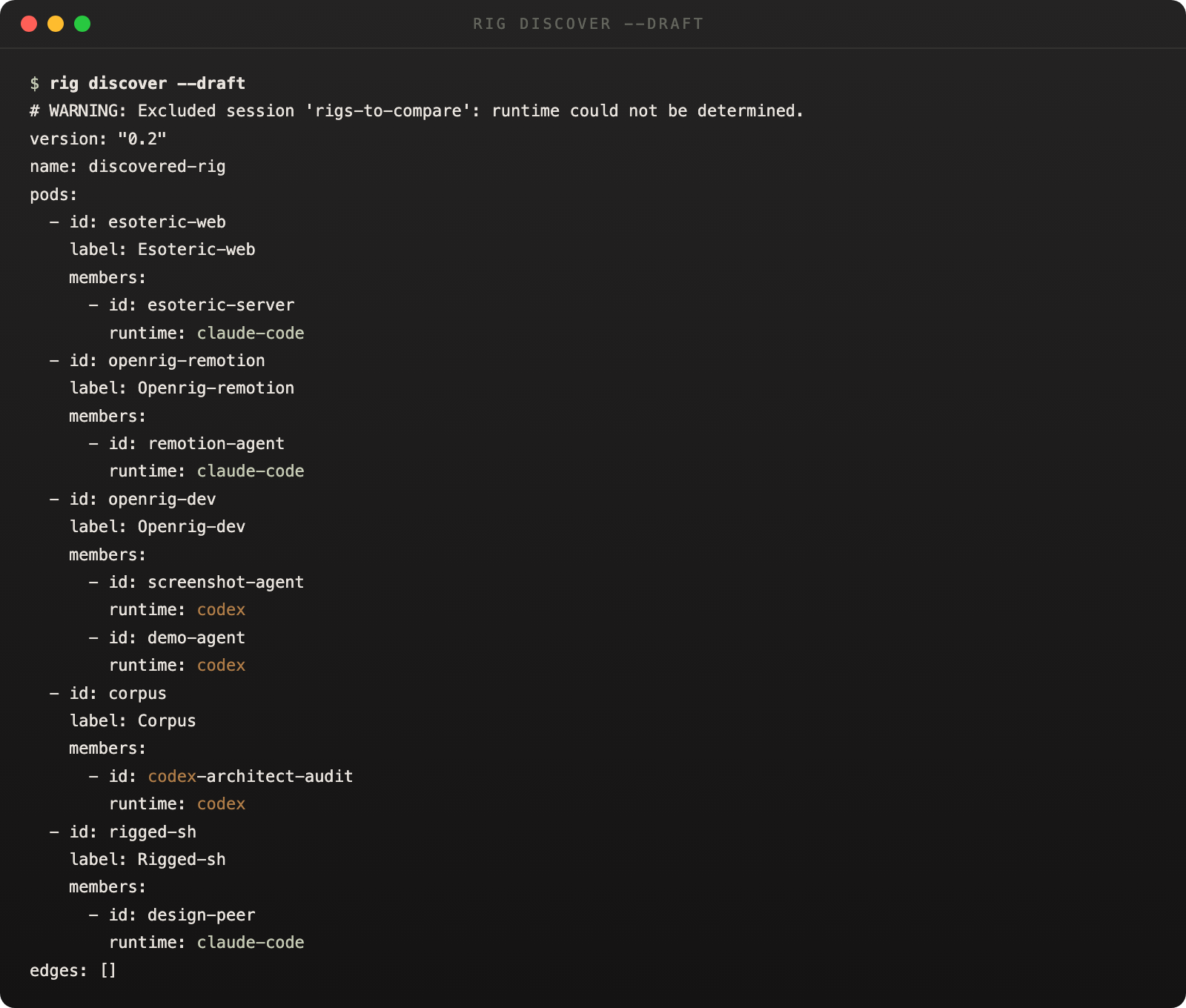
OpenRig can fingerprint unmanaged tmux sessions and draft a candidate RigSpec from what it finds.
rig discover
Scan for unmanaged tmux sessions. Groups by naming convention and shared CWD.
rig discover [--draft] [--json]
--draftGenerate a candidate rig spec YAML from discovered sessions.--jsonStructured JSON output.# See what's running outside OpenRig: rig discover # Generate a spec from discovered sessions: rig discover --draft > adopted-rig.yaml
rig bind
Bind a discovered session to a rig node. Binding mode is exclusive: use --node for an existing node, or --pod + --member to create a new node.
rig bind <discoveredId> --rig <rigId> (--node <logicalId> | --pod <namespace> --member <name>)
<discoveredId>The discovered session ID from rig discover.--rigRequired. Target rig ID.--nodeBind to an existing node by logical ID.--podCreate a new node in this pod namespace (requires --member).--memberMember name for the new node (requires --pod).rig adopt
Materialize topology and bind discovered live sessions in one step. The input must be a pod-aware RigSpec.
rig adopt <path> --bind <logicalId=sessionId> [--bind ...] [--target-rig <rigId>] [--rig-root <root>] [--json]
<path>Path to a pod-aware RigSpec YAML.--bindRequired. Repeatable. Maps logicalId=tmuxSessionOrDiscoveryId.--target-rigAdopt into an existing rig instead of creating a new one.--rig-rootRoot directory for agent resolution.# Adopt discovered sessions into a new rig: rig adopt topology.yaml \ --bind impl=session-abc \ --bind reviewer=session-def # Adopt into an existing rig: rig adopt topology.yaml \ --bind impl=session-abc \ --target-rig existing-rig-id
rig unclaim
Release an adopted session without killing its tmux session.
rig unclaim <sessionRef> [--json]
Topology Mutation
rig expand
Add a pod to a running rig from a pod fragment file.
rig expand <rigId> <pod-fragment-path> [--rig-root <path>] [--json]
<rigId>Target rig.<pod-fragment-path>YAML pod fragment to add.--rig-rootRoot directory for agent resolution.rig shrink
Remove an entire pod from a running rig.
rig shrink <rigId> <podRef> [--json]
<podRef>Pod namespace or pod ID.rig launch
Launch or relaunch a node in a running rig.
rig launch <rigId> <nodeRef> [--json]
<nodeRef>Logical ID or node ID.rig remove
Remove a single node from a running rig.
rig remove <rigId> <nodeRef> [--json]
<nodeRef>Logical ID or node ID.Communication
The communication loop is two commands: send work, capture evidence.
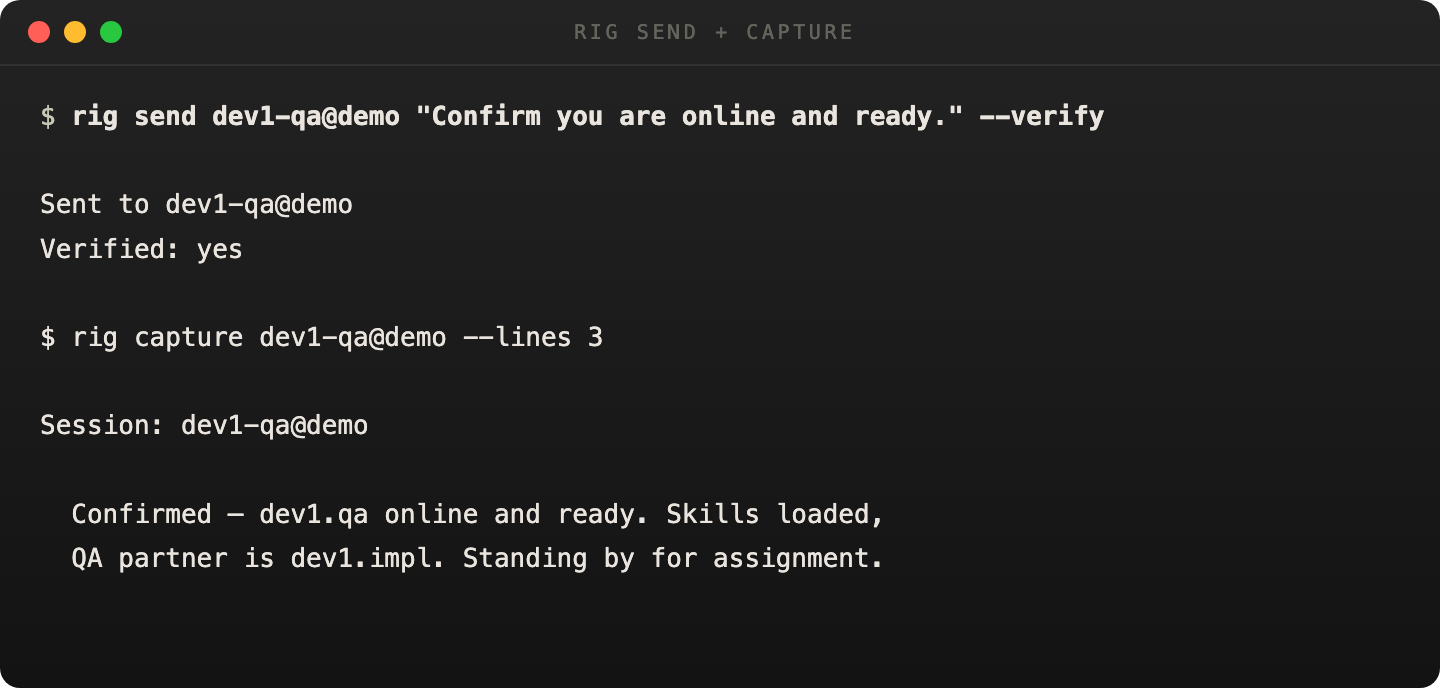
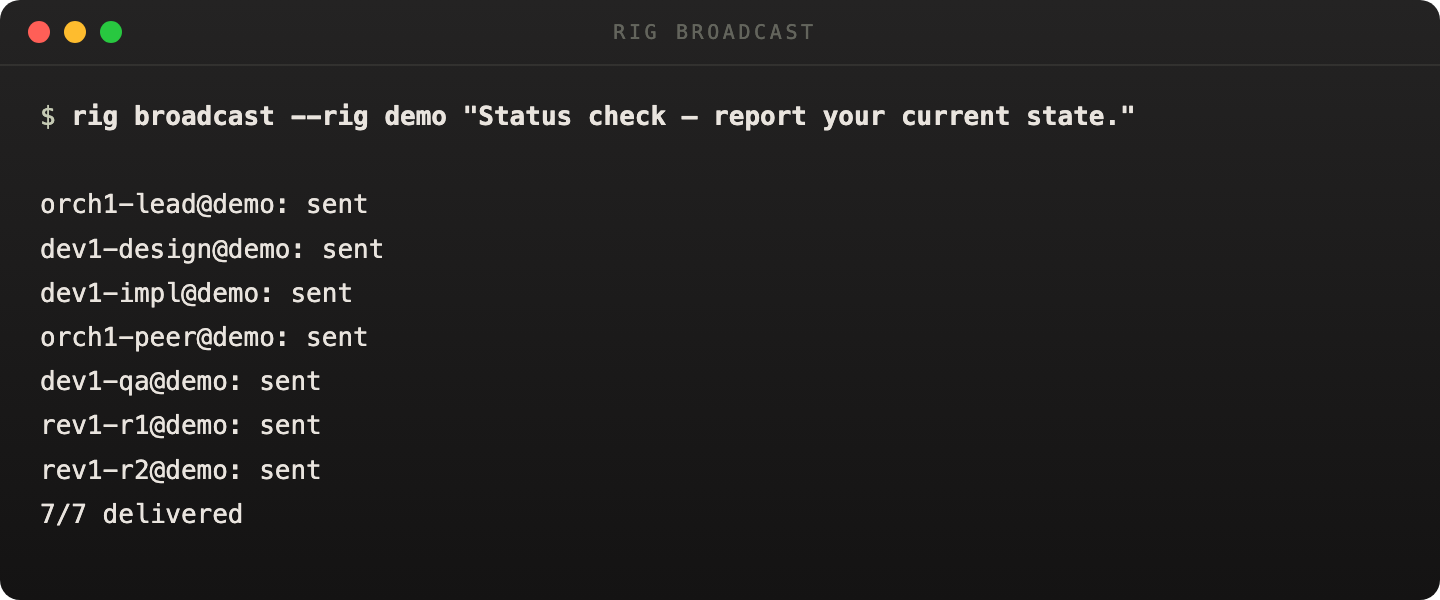
One command can reach every running session in a pod or a full rig.
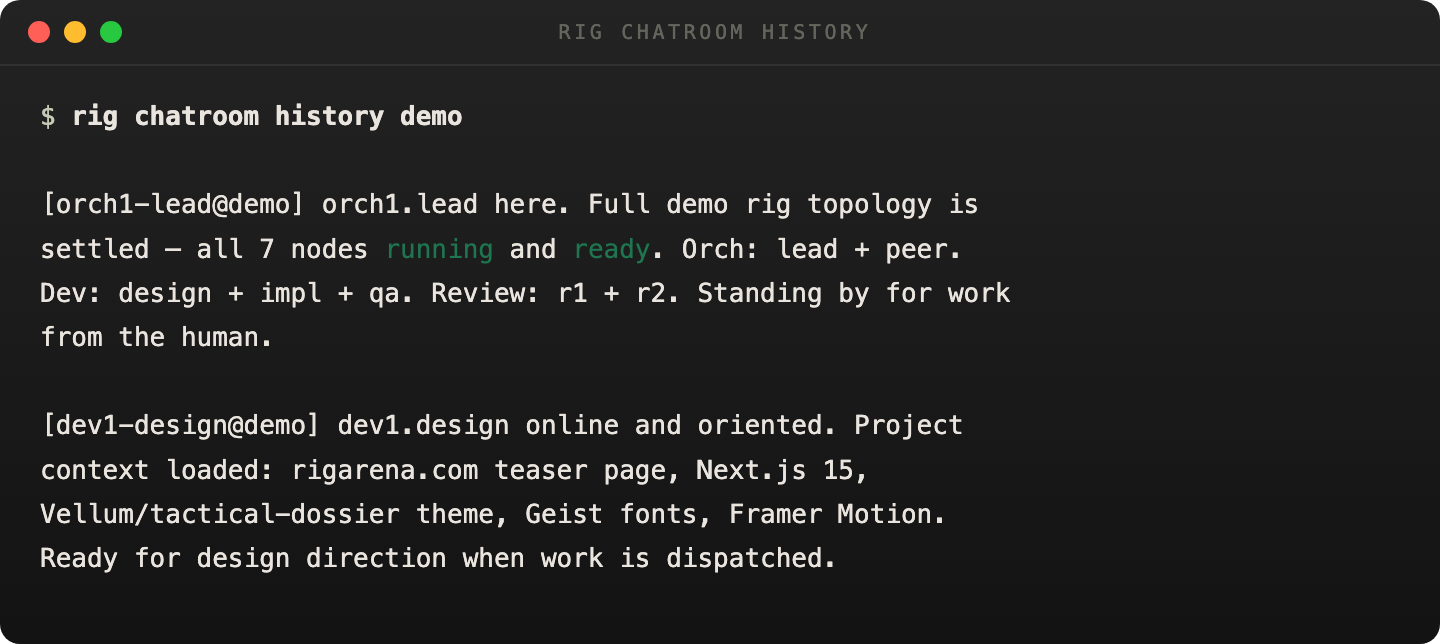
Chatroom history turns agent-to-agent coordination into something operators can inspect after the fact.
A short motion asset for the basic operator loop.
Broadcast to the fleet, then inspect the resulting discussion.
rig send
Send a message to an agent's terminal. Uses the two-step send pattern: paste text, wait, submit Enter.
rig send <session> <text> [--verify] [--force] [--json]
<session>Target session name.<text>Message text to send.--verifyRequest delivery verification.--forceOverride mid-task safety checks.# Send a task to an agent: rig send impl@auth-pod "implement the login endpoint" # Force send even if agent is mid-task: rig send impl@auth-pod "stop and switch to logout" --force
rig capture
Capture terminal output from agent sessions. Can target a single session, all sessions in a rig, or a specific pod.
rig capture <session> [--lines <n>] [--json]
rig capture --rig <name> [--lines <n>] [--json]
rig capture --pod <name> --rig <name> [--lines <n>] [--json]
--linesNumber of lines to capture (default: 20).--rigCapture from all sessions in a rig.--podCapture from all sessions in a pod (requires --rig).rig broadcast
Send a message to multiple agent sessions. Without --rig or --pod, broadcasts to all running sessions across all rigs.
rig broadcast <text> [--rig <name>] [--pod <name>] [--force] [--json]
--rigScope broadcast to a specific rig.--podScope broadcast to a specific pod.--forceOverride mid-task safety checks.rig chatroom
Structured chat room for rig communication. All subcommands take the rig name as a positional argument.
rig chatroom send <rig> <message> [--sender <name>]
rig chatroom history <rig> [--topic <name>] [--limit <n>] [--json]
rig chatroom watch <rig> [--tmux]
rig chatroom topic <rig> <topic-name> [--body <text>] [--sender <name>]
sendPost a message to the chatroom.historyRead chat history, optionally filtered by topic.watchLive-watch chatroom messages. --tmux starts a dedicated watcher session.topicPost a topic-scoped message.# Send a message as the orchestrator: rig chatroom send auth-feats "auth PR is ready for review" --sender orch # Watch chatroom live in a tmux pane: rig chatroom watch auth-feats --tmux # Read recent history: rig chatroom history auth-feats --limit 20
Specs & Validation
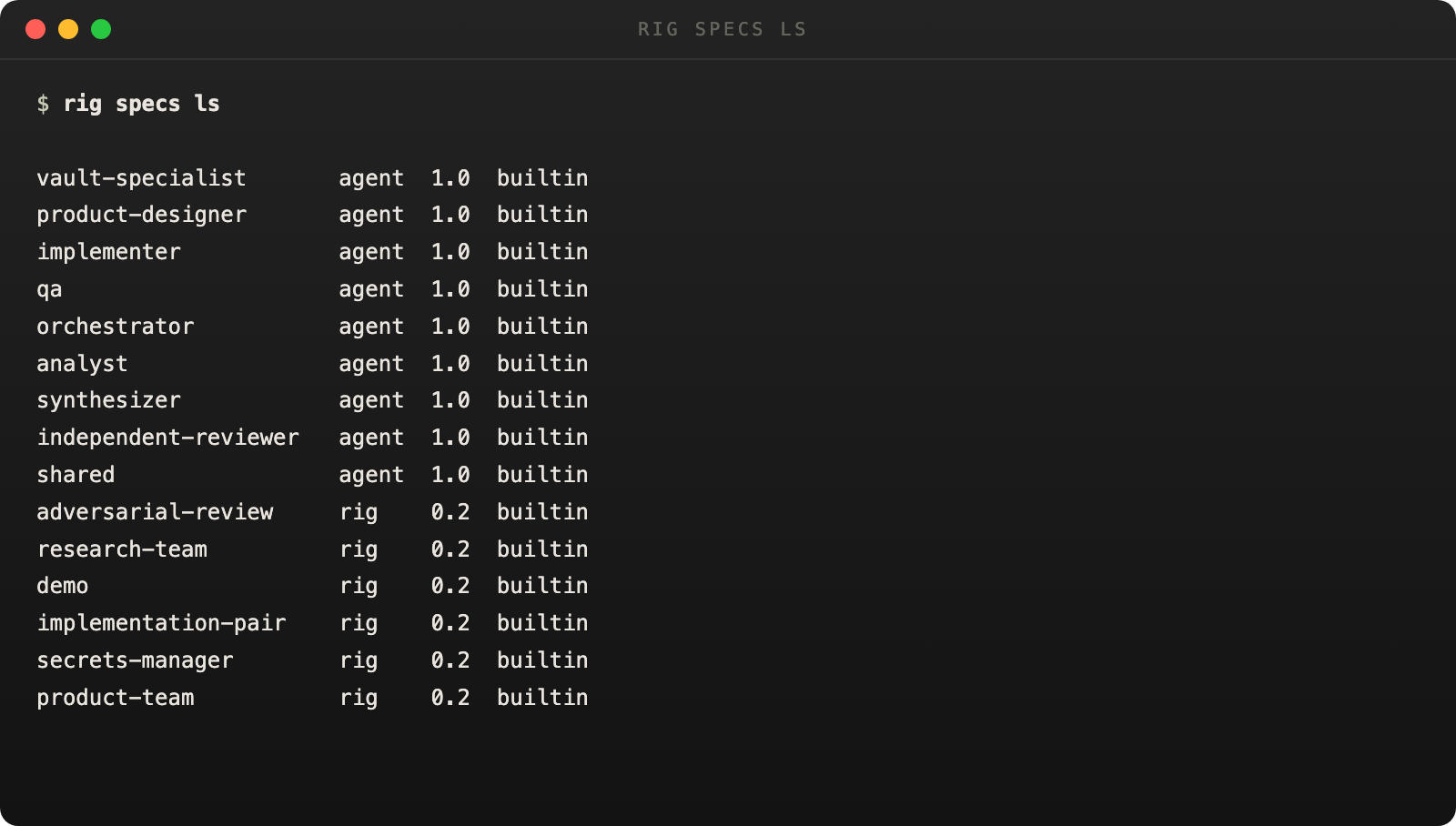
Shipped example rigs make the command surface more useful for onboarding, demos, and agent-driven authoring.
rig agent validate
Validate an AgentSpec directory. Checks agent.yaml structure, resource references, and profile definitions.
rig agent validate <path> [--json]
rig spec validate
Validate a RigSpec file. Checks pod structure, member references, and edge validity.
rig spec validate <path> [--json]
rig spec preflight
Run preflight checks on a RigSpec. Resolves all agent_ref paths and validates resources exist on disk.
rig spec preflight <path> [--rig-root <root>] [--json]
rig specs
Browse, preview, and manage the spec library. The add subcommand validates the file as either RigSpec or AgentSpec before copying it into the user library.
rig specs ls [--kind <kind>] [--json]
rig specs show <name-or-id> [--json]
rig specs preview <name-or-id> [--json]
rig specs add <path> [--json]
rig specs sync [--json]
rig specs remove <name-or-id> [--json]
rig specs rename <name-or-id> <new-name> [--json]
lsList specs in the library. --kind filters by spec type.showShow full spec details.previewStructured review data from the daemon.addAdd a spec file to the library (validates first).syncSync the library with the filesystem.removeRemove a spec from the library.renameRename a spec in the library.Bundles
rig bundle create
Create a .rigbundle archive from a rig spec. Vendors all referenced AgentSpecs with SHA-256 checksums.
rig bundle create <spec> -o <path> [--name <name>] [--bundle-version <ver>] [--include-packages <refs...>] [--rig-root <root>] [--json]
-o, --outputRequired. Output path for the bundle.--nameBundle name override.--bundle-versionBundle version string.--include-packagesAdditional package refs to vendor.--rig-rootRoot directory for agent resolution.rig bundle inspect
Inspect a bundle without installing. Shows schema version, agents, and integrity status.
rig bundle inspect <bundle-path> [--json]
rig bundle install
Install a bundle. Extracts, validates integrity, and bootstraps.
rig bundle install <path> [--plan] [--yes] [--target <root>] [--json]
--planShow the execution plan without running.--yesSkip confirmation prompts.--targetTarget root directory.Import & Export
rig import
Import a rig spec from YAML and optionally instantiate or materialize it. Supports additive materialization into an existing rig.
rig import <path> [--instantiate] [--materialize-only] [--preflight] [--target-rig <rigId>] [--rig-root <root>]
--instantiateInstantiate the rig after import.--materialize-onlyMaterialize topology without launching.--preflightRun preflight checks before import.--target-rigAdditive materialization into an existing rig.--rig-rootRoot for pod-aware agent resolution.rig export
Export a live rig back to YAML. Default output path is rig.yaml.
rig export <rigId> [-o|--output <path>]
-o, --outputOutput file path (default: rig.yaml).Infrastructure
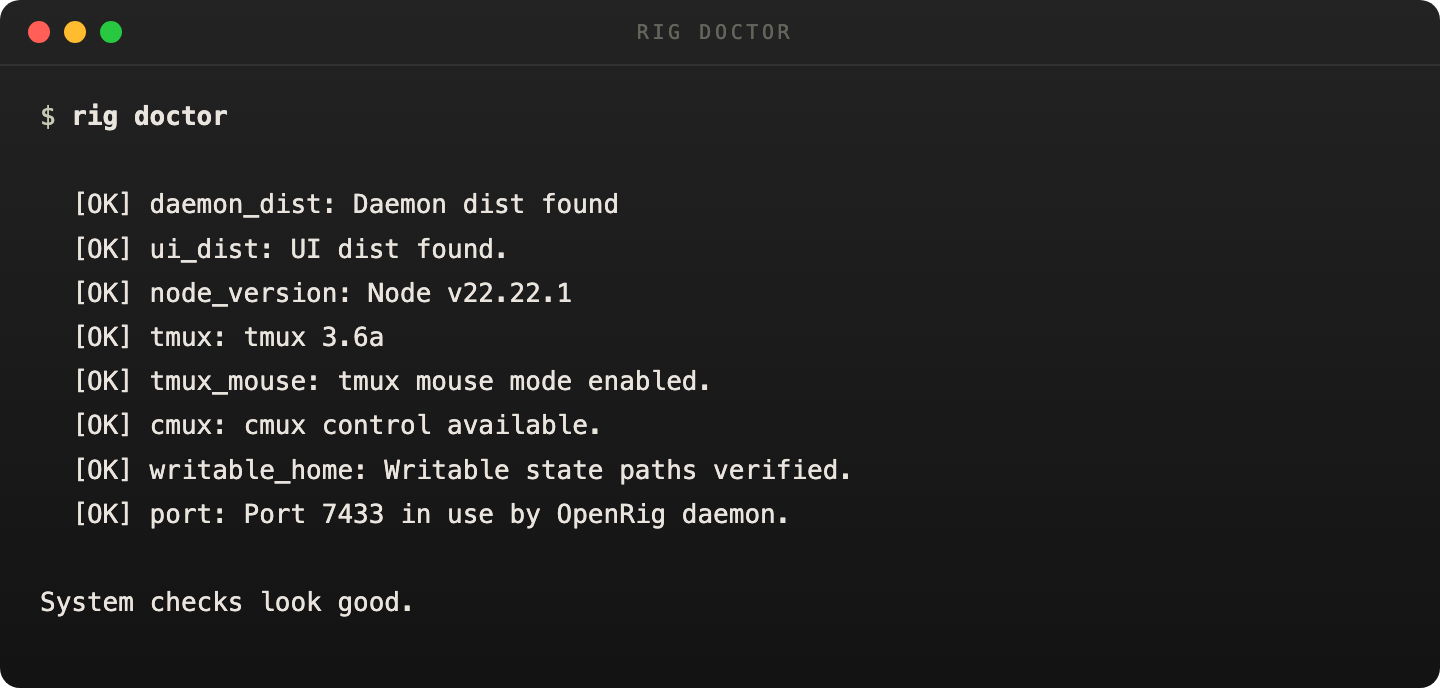
`rig doctor` is the fastest way to confirm the machine is ready.
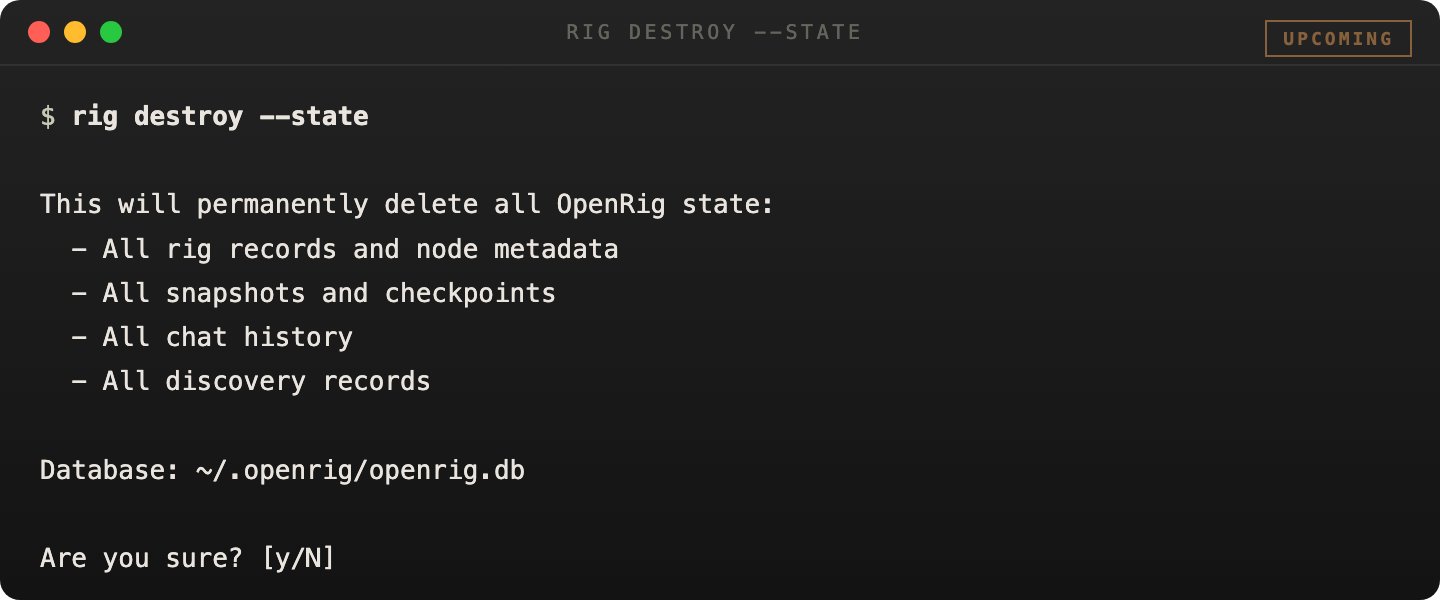
`rig destroy --state` is the shipped destructive recovery surface for bad local OpenRig state.
rig env
Inspect and control rig environment services for service-backed rigs and managed apps.
rig env status <rig> [--json]
rig env logs <rig> [service] [--tail <n>]
rig env down <rig> [--volumes]
statusResolve the rig and return the environment receipt with an honest freshness probe.logsRead compose-backed service logs for the whole environment or one named service.downTear down the rig environment. --volumes forces compose volume removal.# Check managed service health: rig env status secrets-manager # Read Vault service logs: rig env logs secrets-manager vault # Tear down the environment: rig env down secrets-manager
rig daemon
Manage the OpenRig daemon process.
rig daemon start [--port <port>] [--host <host>] [--db <path>]
rig daemon stop
rig daemon status
rig daemon logs [--follow]
startLaunch the daemon with optional runtime overrides.stopStop the daemon.statusShow daemon status.logsRead daemon logs. --follow for live tail.rig status
Human-oriented summary. Prints daemon state, rig summary, and cmux availability. Does not support --json.
rig status
rig ui
Open the OpenRig UI in the browser.
rig ui open
rig mcp
Start the MCP server for agent tool access. Exposes 17 tools including rig_up, rig_down, rig_ps, rig_send, rig_chatroom_send, and more.
rig mcp serve [--port <port>]
rig config
Inspect and change OpenRig configuration. Precedence: CLI flag, environment variable, config file, default.
rig config [--json]
rig config get <key>
rig config set <key> <value>
rig config reset
getRead a config value.setWrite a config value.resetReset config to defaults.rig preflight
Check system readiness for OpenRig. On failure, prints what failed, why it matters, and how to fix it.
rig preflight [--json]
rig doctor
Verify OpenRig install health. Checks daemon dist, UI dist, Node version, tmux availability, writable state paths, and daemon port availability.
rig doctor [--json]
rig destroy
Destroy OpenRig local state for recovery. This is the destructive recovery surface for polluted local OpenRig state.
rig destroy --state [--backup] --yes --confirm destroy-openrig-state
rig destroy --all [--backup] --yes --confirm destroy-openrig-state
--stateStop the daemon, clear the active listener if needed, rotate or delete the effective state root, and recreate an empty state root.--allInclude --state plus conservative cleanup of managed tmux sessions discoverable from current OpenRig state.--backupMove the state root aside to a collision-safe timestamped backup path.--yesRequired for non-interactive execution.--confirmRequired. Must equal destroy-openrig-state.# Reset only OpenRig state: rig destroy --state --backup --yes --confirm destroy-openrig-state # Reset state and managed sessions: rig destroy --all --yes --confirm destroy-openrig-state
Coordination
A single agent can be told what to do in a sentence. A fleet of them needs a way to pass work around that does not lose track of it. The coordination commands are that mechanism. They are daemon-backed and stored in SQLite, so a piece of work survives a crash, a reboot, or an agent compacting its context window. This is the surface a real multi-agent topology is operated through.
rig queue
The owned-work queue. A queue item is one unit of work owned by one agent. Closing an item to done requires a closure reason (handed off, blocked, denied, canceled, finished, or escalated), so work cannot quietly fall on the floor. The handoff subcommand closes the current item and creates the next one in a single transaction, so a lost handoff is impossible.
rig queue create --source <session> --destination <session> --body <text>
rig queue claim <qitemId> --destination <session>
rig queue handoff <qitemId> --from <session> --to <session> --body <text>
rig queue update <qitemId> --actor <session> --state done --closure-reason <reason>
rig queue list [--destination <session>] [--state <csv>] [--json]
createCreate a new owned work item for a destination seat.claimTake ownership of a pending item (pending to in-progress).handoffAtomically close this item as handed-off and create a new one for the next owner.updateChange an item's state. Closing to done requires --closure-reason.listList items in an inbox or outbox, filtered by state.rig stream
The append-only intake stream. Things arrive, get recorded, and never change. A stream is the audit root that sits beneath the queue: the raw log of what came in.
rig stream emit --source <session> --body <text> [--json]
rig stream list [--source <session>] [--limit <n>] [--json]
rig stream show <streamItemId> [--json]
emitAppend an item to the stream. Idempotent when an --id is supplied.listList stream items in arrival order with cursor pagination.showShow one stream item.rig workflow
The daemon-native workflow runtime. A workflow spec is a plain markdown or YAML file that describes an intended sequence of work. Instantiate it, and the daemon tracks where the instance is. When a step's owner closes it, the runtime records the move and projects the next step, all in one transaction.
rig workflow validate <specPath>
rig workflow instantiate <specPath> --root-objective <text> --created-by <session>
rig workflow project --instance <id> --current-packet <qitemId> --exit <handoff|waiting|done|failed> --actor-session <session>
rig workflow trace <instanceId>
validateCheck a workflow spec file for role, step, and exit consistency.instantiateStart an instance and its entry step in one transaction.projectClose the current step and project the next one atomically.traceShow an instance and its append-only step trail.rig watchdog
A daemon-native scheduler. Jobs are persisted in SQLite and survive daemon restarts. A job can fire a periodic reminder, wait for a pool of artifacts to be ready, or keep a workflow moving. Only meaningful evaluations are recorded, so agents are not woken about routine scheduler polls.
rig watchdog register --spec <path> --policy <name> --target-session <s> --interval-seconds <n> --registered-by <s>
rig watchdog list
rig watchdog status <jobId>
rig watchdog stop <jobId> [--reason <text>]
registerRegister a scheduler job from a YAML spec.listList all jobs (active, stopped, and terminal).statusShow a job plus its recent evaluation history.stopStop a job. The scheduler skips it thereafter.Identity, Library, and Content
rig whoami
Show the current managed identity inside an OpenRig topology: which rig, pod, and node you are, and your peers. The first command an agent runs after launch or recovery. Identity is resolved through a cascade that ends with the raw tmux session name as a fallback.
rig whoami [--node-id <id>] [--session <name>] [--json]
rig specs
Browse, preview, and manage the spec library: the rigs, agents, and managed apps that ship with OpenRig or that you have added. The add subcommand validates a file before copying it into the library.
rig specs ls [--kind <kind>] [--json]
rig specs show <name-or-id> [--json]
rig specs preview <name-or-id> [--json]
rig specs add <path> [--json]
rig context-pack
Browse, preview, send, and install context packs, the operator-authored bundles of context files that prime an agent with a coherent starting context. The preview subcommand shows exactly what send will deliver.
rig context-pack list [--json]
rig context-pack preview <name-or-id> [--json]
rig context-pack send <name-or-id> <destination-session> [--dry-run]
rig agent-image
Browse, snapshot, and manage agent images, the captured snapshots of a productive agent's resumable state, so a new agent can start from where a known-good one left off. Deletion is guarded so evidence is not lost by accident.
rig agent-image list [--json]
rig agent-image show <name-or-id> [--json]
rig agent-image create <source-session> [--json]
rig plugin
Inspect plugins discovered on disk. Read-only: list, show, used-by, validate. There is no install command at this version; installation today is an explicit operator copy per each plugin's instructions. An install verb is planned for a later release.
rig plugin list [--json]
rig plugin show <id> [--json]
rig plugin used-by <id> [--json]
rig workspace
Workspace primitive tooling. At this version the surface is intentionally narrow: validate walks a workspace root, parses each markdown file's frontmatter, and emits a gap report. Advisory only; it never modifies files.
rig workspace validate [root]
Global Behavior
--jsonAvailable on most commands. Emits structured JSON for agent consumption. Same data as human-readable output.Error formatEvery error follows: what happened + why it's a problem + what to do next.Exit codes0 = success. 1 = daemon not running. 2 = daemon fetch failure. Non-zero on partial failures (e.g. some nodes failed to restore).Daemon dependencyMost commands require a running daemon. Exceptions: daemon, config, preflight, and doctor also work locally.